

What is aven?
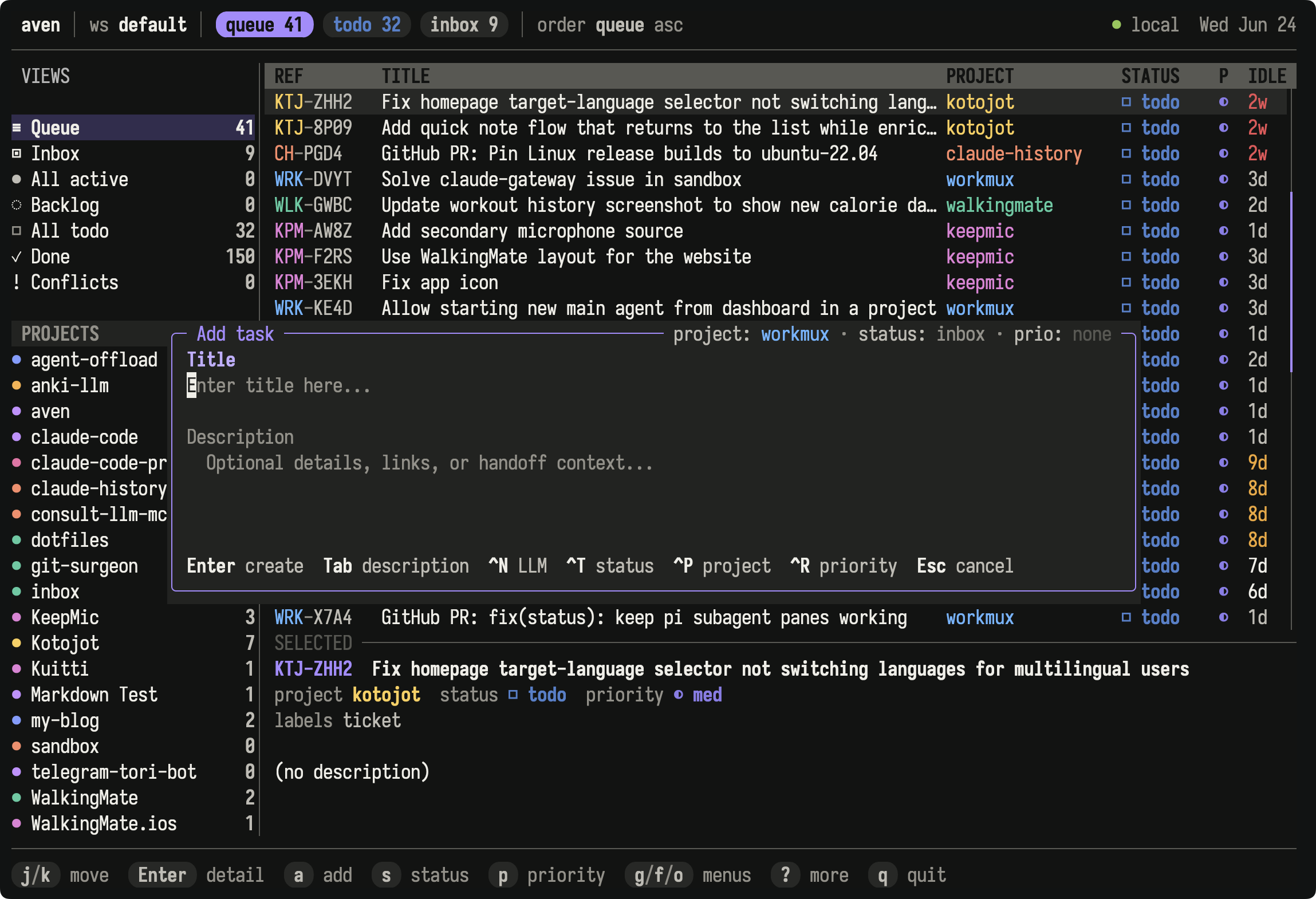
aven is a local-first task manager for power users and coding agents. It keeps work from different projects in one queue, with a fast terminal UI for hands-on task management and a compact CLI for agents and automation.
Why aven?
Section titled “Why aven?”- See what to work on next across all your repositories in one queue, while keeping every task tied to its project.
- Add tasks from the TUI, CLI, natural-language intake, a tmux popup, or an agent workflow.
- Organize and schedule work with priorities, labels, epics, dependencies, due dates, deferred availability, and recurring tasks.
- Let coding agents work from the same queue you do: they can pick up ready work, capture follow-ups, and leave notes that outlive the chat session.
- Move quickly through task management in a polished, keyboard-first TUI.
- Work offline with tasks stored in SQLite. Optional self-hosted sync shares them across machines.
- Keep the details needed to resume work with Jira/Linear-style IDs such as
APP-7KQ9, Markdown descriptions, notes, and image attachments. - Separate personal and work tasks into workspaces.
Design principles
Section titled “Design principles”Taskwarrior is a major inspiration, but aven has its own approach to agents, IDs, Markdown descriptions and notes, workspaces, and terminal interaction. See Coming from Taskwarrior for a comparison and migration workflow.
The local SQLite database is the working copy for both the TUI and CLI. Sync is optional and lets multiple machines use the same tasks.
Tasks live outside repositories, so they survive branch switches, worktrees, repository clones, and dirty git states. Repositories provide project context without owning the task data. The same store can support the TUI, agent CLI, terminal capture flows, sync clients, and other integrations. A Telegram bot, future iOS app, or similar entrypoint can create project-scoped tasks without cloning every repository. You can run the sync server on a Raspberry Pi or home server and connect devices through a VPN or private network.
The CLI is designed for agents and automation. Its output is compact, token-efficient, stable, and explicit. Agents can capture follow-up work, update status, add notes, and leave handoff context without relying on hidden UI state.
The Rust TUI is designed for power users. Its keyboard shortcuts cover browsing, triage, editing, filtering, sorting, task detail, undo, and navigation. It also supports mouse input and a command palette.
Task IDs provide stable identity. They can be created offline on different devices without coordination. As with git commit hashes, aven displays the shortest unique form it can. An ID such as APP-7KQ9 is easier to type and paste than a UUID while still identifying one task.
Context stays with the task. Markdown descriptions, notes, and image attachments hold problem statements, decisions, blockers, screenshots, and partial progress.
Workspaces keep personal and work tasks in the same database while separating their queues, IDs, labels, and projects. Workspace routes can make a directory such as ~/work open the matching workspace automatically. You can also choose a workspace directly in the TUI.
Where to go next
Section titled “Where to go next”- Getting started to install aven and begin using your own task database.
- Concepts to understand workspaces, projects, statuses, refs, and the queue.
- Using the TUI to learn navigation, views, filters, and shortcuts.
- Work with agents to connect coding agents and other AI integrations.
- Sync across devices to configure optional self-hosted sync.